Introduction
A few months ago, I wrote about setting up a newsletter for this blog. The process involved using Gemini Code Assist to add a MailerLite sign-up form to the end of my posts. That worked well enough in the end, but the workflow for actually sending newsletters was never fully implemented. I had hoped to use MailerLite’s RSS to Newsletters, but this ultimately didn’t fit my needs. To make matters worse, it’s a paid feature. We’re not big enough yet to justify something like that.
But this is exactly the kind of problem agents can help solve. So today, I’ll document the next step in this journey. The goal is automating newsletter creation so that publishing a new post automatically drafts a campaign ready for review.
What I Explored
Now, automating newsletter delivery isn’t exactly novel technology. Plenty of solutions exist. The value of agentic development is how quickly you can bend one of these solutions to your specific needs. But you still need to survey the landscape and have enough technical intuition to sketch the outlines of a workable approach. Here are a few of the options that I surveyed.
Resend and Custom Solutions
I looked at Resend as an alternative email provider. It’s developer-friendly with a great API, but I’d lose MailerLite’s:
- Contact management and subscriber lists
- Built-in forms and landing pages
- Analytics and engagement tracking
Rebuilding all of that seemed like overkill for a personal blog. Much of this was tied to laziness and inertia. I had already solved my first problem, why should I do work to implement it again?
Zapier or n8n
Workflow automation tools could bridge the gap. That version of the solution looked something like this:
- A GitHub action would grab all of my contacts from MailerLite
- The workflow tool, Zapier or n8n, would get post content for an email
- It would connect to another service to send the email
But they add complexity, another service to manage, and often have their own pricing tiers for anything beyond basic automation. And given the skeleton above, there is no reason why I should have to go to a no-code solution. My agent will write basically any code I could ever need.
The Solution: GitHub Actions + MailerLite API
The pieces clicked when I realized:
- GitHub Actions gives me free compute triggered on every push
- MailerLite has a well-documented API for creating campaigns
- My posts are just markdown files with structured frontmatter
This is a perfect use case for OpenCode, which can quickly wrap APIs and build automation scripts. It reads faster than I could ever hope to. This is the kind of basic task where any solution in code would be good enough.
Implementation
The Workflow
The GitHub Actions workflow is straightforward:
name: Create Newsletter Draft

on:
  push:
    branches: [master, main]
    paths:
      - '_posts/**'
  workflow_dispatch:
    inputs:
      post_path:
        description: 'Path to post file (e.g., _posts/2025-01-18-my-post.md)'
        required: false
        type: string

jobs:
  create-newsletter:
    runs-on: ubuntu-latest

    steps:
      - name: Checkout repository
        uses: actions/checkout@v4
        with:
          fetch-depth: 2

      - name: Detect new posts
        id: detect
        run: |
          # Detect changed posts in _posts/ directory
          # Or use manual input if provided
When a new post lands in _posts/, the workflow detects it and processes the markdown file directly. The check happens every time I commit to this blog’s repo. The workflow_dispatch gives me the option of manually triggering the workflow. This is really helpful during testing, since I don’t want to always be tied to a git commit.
Parsing Frontmatter
My original plan was the render the page and upload the whole thing into MailerLite, but MailerLite’s free tier doesn’t support setting HTML content via API. That’s an Advanced plan feature too. So instead of building the site with Jekyll to extract content, a Python script parses markdown frontmatter directly:
def parse_frontmatter(markdown_path: str) -> tuple[dict, str]:
    """Parse YAML frontmatter and content from a markdown file."""
    with open(markdown_path, "r", encoding="utf-8") as f:
        content = f.read()

    if not content.startswith("---"):
        return {}, content

    parts = content.split("---", 2)
    if len(parts) < 3:
        return {}, content

    # Parse the frontmatter YAML
    frontmatter_text = parts[1].strip()
    body = parts[2].strip()

    # ... parse YAML into dict ...

    return frontmatter, body
Extracting Intro Paragraphs
For a Substack-like experience, I wanted just the introduction before a “read more” link. The script extracts content after the ## Introduction heading but before the next section:
def extract_intro_paragraphs(markdown_content: str, max_paragraphs: int = 3) -> str:
    """Extract intro paragraphs before first ## heading."""
    lines = markdown_content.split("\n")

    intro_lines = []
    found_intro_heading = False

    for line in lines:
        if line.strip() == "## Introduction":
            found_intro_heading = True
            continue

        # Stop at next ## heading
        if line.startswith("## ") and found_intro_heading:
            break

        intro_lines.append(line)

    # Clean up markdown formatting
    # ...

    return result
The MailerLite Limitation
So to actually generate the post, I remain the human-in-the-loop. This isn’t too far from my original design. I wanted a review step before anything goes out. At this current stage, my review step also involves copy and paste. The script creates a draft campaign with the correct metadata (title, sender, reply-to), then outputs all the content fields:
======================================================================
CAMPAIGN CREATED SUCCESSFULLY
======================================================================
Campaign URL: https://dashboard.mailerlite.com/campaigns/{id}/content

Copy the fields below into MailerLite's block editor:

----------------------------------------------------------------------
POST URL (for button/link):
----------------------------------------------------------------------
https://www.msquinn.com/blog/2025/01/19/newsletter-automation/

----------------------------------------------------------------------
HERO IMAGE URL:
----------------------------------------------------------------------
https://www.msquinn.com/images/placeholder.jpg

----------------------------------------------------------------------
HEADLINE / TITLE:
----------------------------------------------------------------------
You can just do stuff: More automation in the annals of building a newsletter

----------------------------------------------------------------------
EXCERPT (for preview text / subtitle):
----------------------------------------------------------------------
Using OpenCode and GitHub Actions to streamline newsletter creation

----------------------------------------------------------------------
DATE & READING TIME:
----------------------------------------------------------------------
January 19, 2025 · 5 min read

----------------------------------------------------------------------
INTRO PARAGRAPHS (main content before 'Read more'):
----------------------------------------------------------------------
A few months ago, I wrote about setting up a newsletter for this blog...
It’s not fully automatic, but it’s a massive improvement over what came before: essentially nothing. The campaign exists, the subject line is set, and all content is ready to paste into blocks.
The End Result
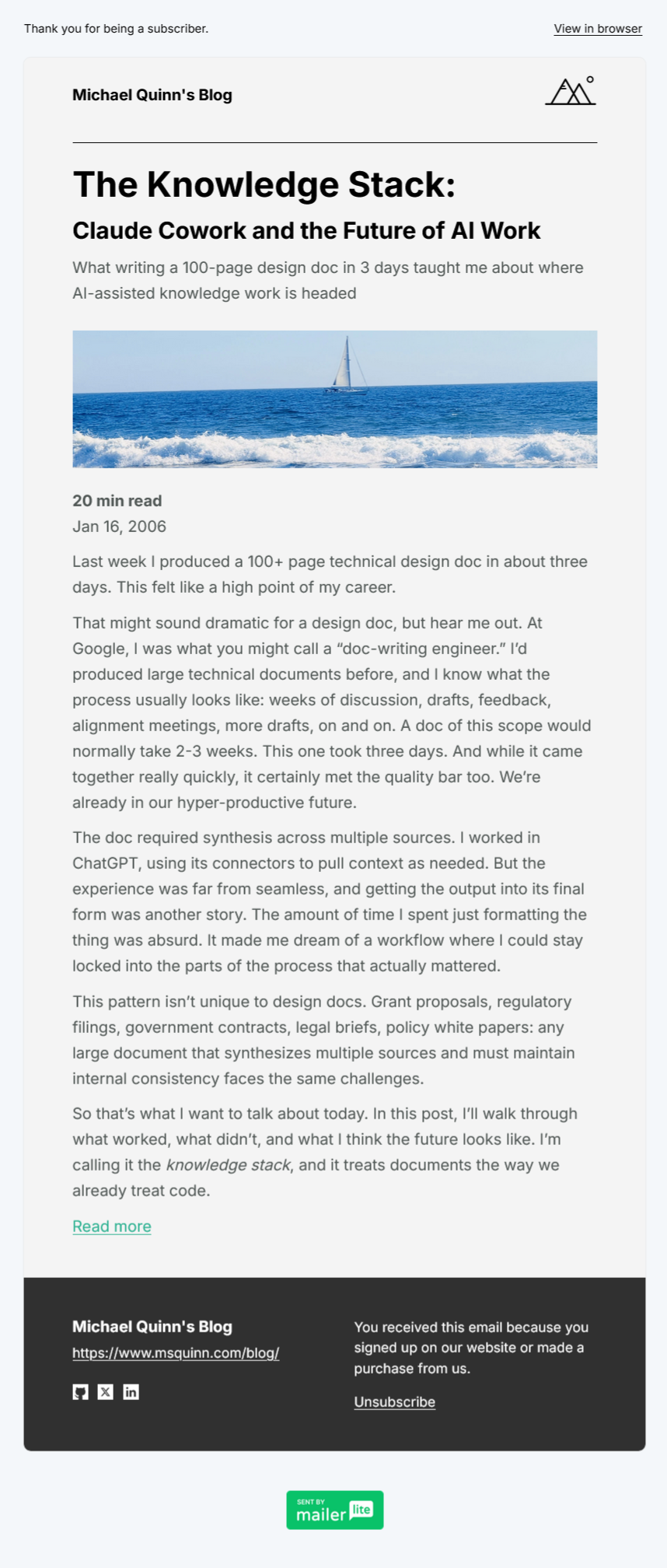
Here’s an example of what subscribers receive. While far from perfect and still very much in the style of MailerLite’s block editor, it adds a professional-enough delivery channel for my blog.
Lessons Learned
Along with this new feature, the exercise gave me a few bigger lessons about the state of AI-assisted work.
Compute is everywhere
GitHub Actions, Cloudflare Workers, Vercel Functions are all examples of the same basic story: free compute is abundant. Small automations like this should be at the top of everyone’s mind when they find themselves doing repetitive tasks. You can write one file in an hour or so, and you’ll never need to manually do the repetitive task again.
The frictions are real
If you want to work with existing stacks, you’re also working with existing pricing tiers and lock-ins. I could build a fully automated solution with Resend or a custom SMTP setup, but I’d lose the convenience of MailerLite’s subscriber management.
This is the most concrete example of the frictions standing in the way of widespread AI adoption. As Tyler Cowen has noted, AI acceleration means
Human bottlenecks become more important, the more productive is AI. Let’s say AI increases the rate of good pharma ideas by 10x. Well, until the FDA gets its act together, the relevant constraint is the rate of drug approval, not the rate of drug discovery.
Similarly, the more capability that you have to deliver a solution to a problem, the more gaps you’ll see in existing opportunities. I could have easily put together a script that loaded my complete HTML content into MailerLite. In fact, an earlier edition of my workflow did exactly that. But that doesn’t fit MailerLite’s pricing model, so it’s a no-go for now. The technology is ready; the integration isn’t.
Buy vs. Build, eternally
As everyone becomes empowered to be their own software engineer, everyone also accidentally becomes their own CTO. And that means you’ll get to think about all of the classic tradeoffs that CTOs are debating today. MailerLite gives me:
- Contact tracking and segmentation
- Beautiful forms and landing pages
- Deliverability management
- Analytics
I don’t want to build any of that. Why not?
- I’ve debugged DNS TXT records for Cloudflare email routing before, and I’d rather not do it again
- I don’t want to manage subscriber data or write another CRUD interface for contacts
- I don’t want to figure out why emails are landing in spam folders instead of inboxes
There’s a reason “don’t roll your own auth” is a cliche. Some problems are solved, and re-solving them is just ego. The maintenance tax is real. The compromise is accepting MailerLite’s API limitations on the free tier and working around that.
A big win regardless
Even without full automation, this is a significant improvement:
- My blog has a new feature: newsletter drafts are created automatically
- Publishing a newsletter now takes minutes instead of a tedious copy-paste session
- The content extraction ensures consistency across newsletters
Conclusion
The theme of “you can just do stuff” keeps proving itself. With accessible AI coding tools like OpenCode, well-documented APIs, and free compute from GitHub Actions, automations that would have taken days now take hours. I have become pretty skeptical of no-code solutions for workflow automation. Why go through that effort when writing code is so easy?
The friction of existing tools and pricing tiers is real, but the pragmatic middle ground often delivers most of the value. I didn’t get fully automatic newsletter sending, but I removed 80% of the manual work. That’s a win.
If you’re doing something repetitive with your content pipeline, there’s probably a GitHub Action waiting to solve your problem. And if there isn’t one yet, OpenCode can help you build it.
Tools Used
- OpenCode was used for the entire implementation
- The MailerLite API documentation was straightforward to work with
- GitHub Actions provides the automation trigger